Transit Now on iPhone, rebuilt from the ground up
Countdowns to the second, your bus on the lock screen, and a voice that keeps counting.
For most of its life, Transit Now has been an Android app. There was an iPhone version once before, a long time ago. This one is new, rebuilt from the ground up for the iPhone.
It first landed on the App Store last November. Since June it's been updated more than twenty times, so if you tried it early, it's a different app now. Here's what it does.
Your stops, the moment it opens
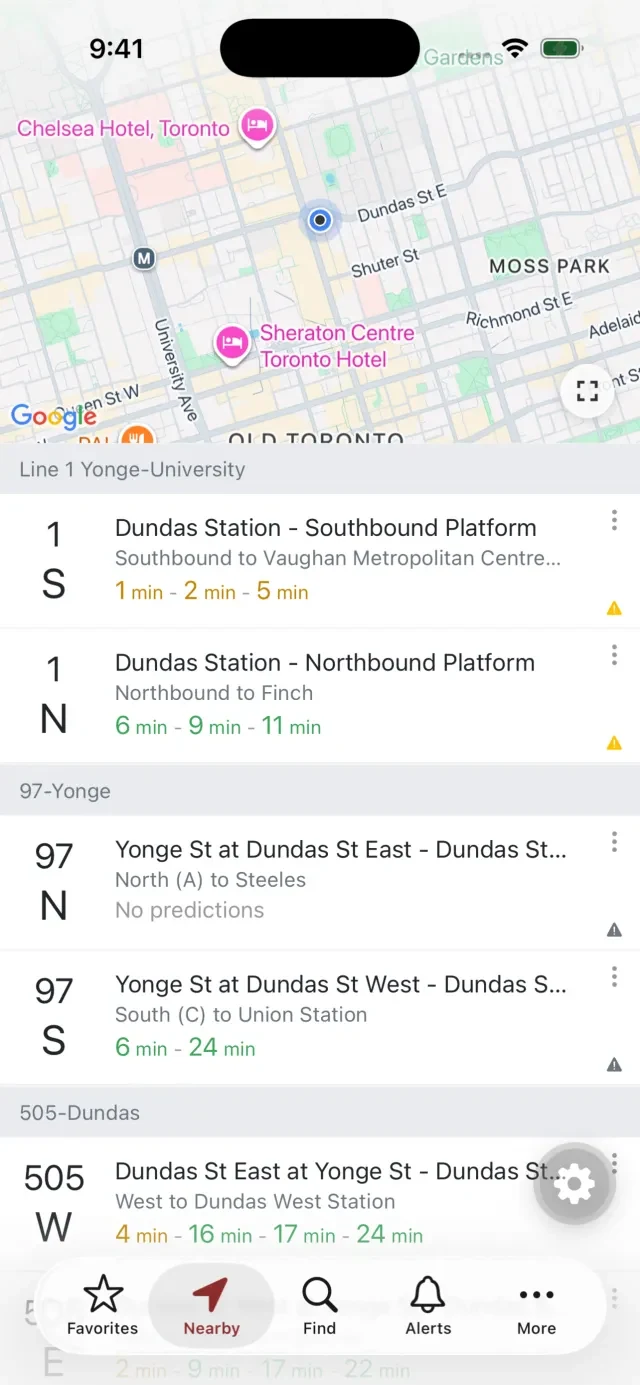
Open the app and the stops around you are already there, on a live map with the list underneath: subway platforms, buses and streetcars, each with the next few arrivals. No searching, no typing.
If you're somewhere new, Find searches by address, place or the stop number on the pole.
Down to the second
One App Store review said the Android app was better because it counts down to the second. Fair point. Now the iPhone app does too. When your bus is under three minutes away, the countdown switches to minutes and seconds and ticks down live. Red means it's right there. Green means you've got time.
Your bus on the lock screen
Track a bus and the countdown follows you out of the app. It sits on your lock screen, and in the Dynamic Island on iPhones that have one. You can check how long you've got without unlocking your phone.
A voice that keeps counting
Tap the speaker on a route and Transit Now counts down out loud: “5 minutes.” “4 minutes.” Then “Arriving now.” It keeps going when you switch apps or lock your phone.
If your phone is on silent, the app tells you before you start, so you're not waiting for a voice that never comes. I wrote more about the voice countdown, and why it matters, in Ding-dong: a transit app you can hear.
Know when to get off
Tap the flag on a stop and tell Transit Now where you're getting off, and which bus you're on. It gives you a heads-up a few minutes before your stop, then “Get off at” and the name of the stop. Handy on a route you don't know, or when you've got your head in a book.
While it's tracking, you can also send someone a live link to your bus. They can watch it come in without the app. More on that in Running late? Send them your bus.
Alerts for the routes you ride
The Alerts tab has three parts: bus and streetcar alerts, the subway, and detours. Alerts for your favourite, recent and nearby routes are marked and moved to the top, and the tab gets a dot when there's something you'd want to know. More in Is the subway running?
Bike Share Toronto, built in
On Android, bike share lives in its own app, Cycle Now. On iPhone it's right inside Transit Now. Bike Share Toronto stations are on the map with live bikes and docks. You can get directions, and track a station so you know if the last bike goes. Press and hold the Transit Now icon on your home screen and choose Bike Share to jump straight there.
And the small things
- Favourites with your own names, like “Home” or “To work”.
- Dark mode: light, dark, or match your phone.
- iPad: it works there too.
Toronto on iPhone
The iPhone app is built for the TTC: buses, streetcars and the subway. If you ride the MBTA in Boston or AC Transit in the East Bay, Transit Now on Android has you covered.
It's free on the App Store. If something's missing that you used on Android, or something doesn't work the way you expect, tell me: support@transitnowapp.com.