Is the subway running? TTC closures, delays and detours in one place
Weekend closures, slow zones and streetcar detours, sorted by line, before you get to the station.
The worst place to find out the subway is closed is at the top of the station stairs. There's a sign about shuttle buses, a crowd forming at the curb, and a trip that just got twenty minutes longer.
The TTC does post all of it. Live delays go on the service alerts page. Weekend closures go in the subway advisories. Streetcar detours and construction go somewhere else again. It's all there, just not in one place, and not when you're halfway out the door.
So Transit Now puts it on one screen, sorted by line.
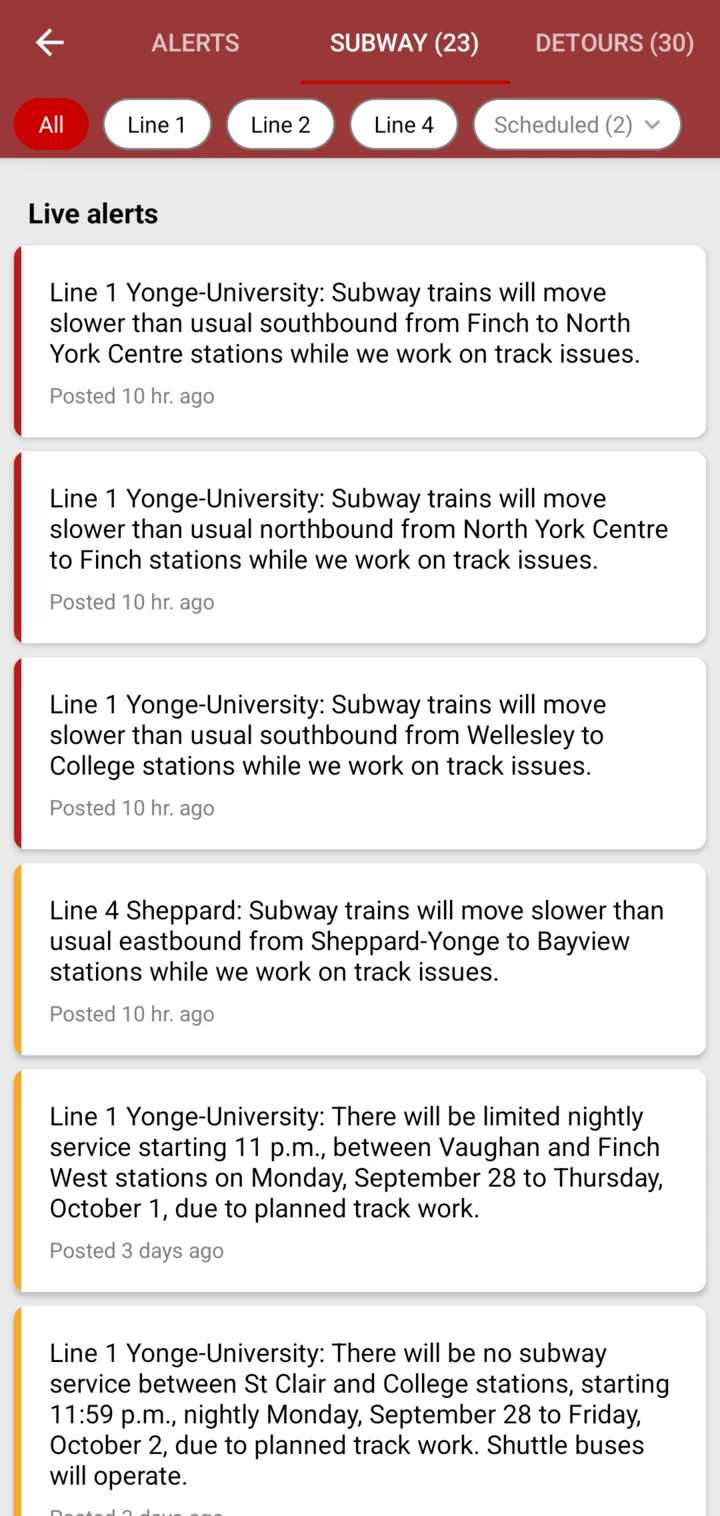
Three tabs: Alerts, Subway, Detours
Tap Alerts and you get three tabs. Each one shows a count, so you can tell how busy things are before you read a word.
- Alerts — buses and streetcars: delays, short turns, stops out of service.
- Subway — delays, slow zones and closures on Lines 1, 2 and 4.
- Detours — streetcar service changes and construction notices.
Tap your line
Along the top of the Subway tab there's a chip for each line: All, Line 1, Line 2, Line 4. Tap yours and everything else gets out of the way. Alerts that affect the whole system stay put, whichever line you pick.
The Alerts tab works the same way, with a chip for each route that has something going on. On iPhone you can pick more than one.
Right now, and coming up
The Subway tab has two parts. First, what's happening right now: a train stuck at a station, a slow zone, a signal problem. Each one says how long ago it was posted.
Then the scheduled closures: the weekend shutdowns and early closings the TTC announces ahead of time. Those show when they start, like “Starts Oct 3”, so you can plan around them before Saturday morning.
One honest note. The app follows how the TTC posts each alert, and the TTC sometimes posts planned work as a regular alert. So before a weekend trip, give both parts a quick look.
Red, amber, grey
Every alert has a coloured edge. Red is urgent: no service, or trains badly delayed. Amber is important but you'll probably still get there. Grey is minor, like a stop that's moved for a day.
Red means change your plan. Amber means leave a bit earlier.
Alerts you don't have to go looking for
Most days, you won't open the Alerts screen at all. The alerts come to you:
- On your stop. Open a stop, and any alert for its routes is right there above the arrival times.
- In your lists. Stops with an alert get a small warning icon, so you notice it before you tap.
- For your routes first. On iPhone, alerts for your favourite, recent and nearby routes are marked and moved to the top. The Alerts tab gets a dot when there's something you'd want to know.
- When you open the app. On Android, urgent alerts and alerts on your favourite routes pop up when you open Transit Now.
Subway alerts, even with the app closed
On Android you can get subway alerts as notifications, even when Transit Now isn't open. It's off by default. To turn it on:
- Open Settings in Transit Now.
- Turn on Subway push notifications.
- Under Subway notification schedule, pick when you want them: Anytime, Rush hour (weekdays, 7–10am and 4–7pm) or Weekends.
Rush hour is the default, because that's when a delay costs you the most. And if one day is just too noisy, there's a Mute button right on the notification.
Straight from the TTC
Everything here comes from the TTC's own service alerts. I don't rewrite them or guess. At the bottom of each tab there's a link to the TTC's page for that kind of alert, and the time the list was last updated. If you ever want the full notice, it's one tap away.
Riding in Boston or the East Bay? On Android, MBTA and AC Transit alerts show up on the Alerts tab too.
Check before you go
A good habit: before a weekend trip, open the Subway tab and tap your line. It takes ten seconds, and it can save you a ride on a shuttle bus.
If an alert ever looks wrong, or you'd like to see something here that isn't, tell me: support@transitnowapp.com.