Ding-dong: a transit app you can hear
Voice countdowns, alarms you can feel, and a chime my mom laughs at every time.
My mom has vision problems. She rides with Transit Now, and when her bus pulls up, her phone goes ding-dong.
She laughs at it every time. It's a classic.
That little chime is the idea behind this post. If reading a screen is hard, a transit app you have to read isn't much help. So Transit Now is one you can listen to, and feel in your pocket. That matters most if the screen is hard to see, and it's handy for everyone else too.
“3 minutes” … “2 minutes” … ding-dong!
The countdown, out loud
Pick your bus and turn on Voice countdown. From then on, Transit Now says how far away it is, every time the minute changes: “5 minutes.” “4 minutes.” You don't have to look at anything. Just listen for the number.
It keeps going with the screen off and the phone in your pocket or bag. When the bus is about to arrive, you hear it:
- On Android, the ding-dong, then “Vehicle arriving”.
- On iPhone, a recorded voice says “Arriving now”, and the phone gives a little tap.
Turning it on
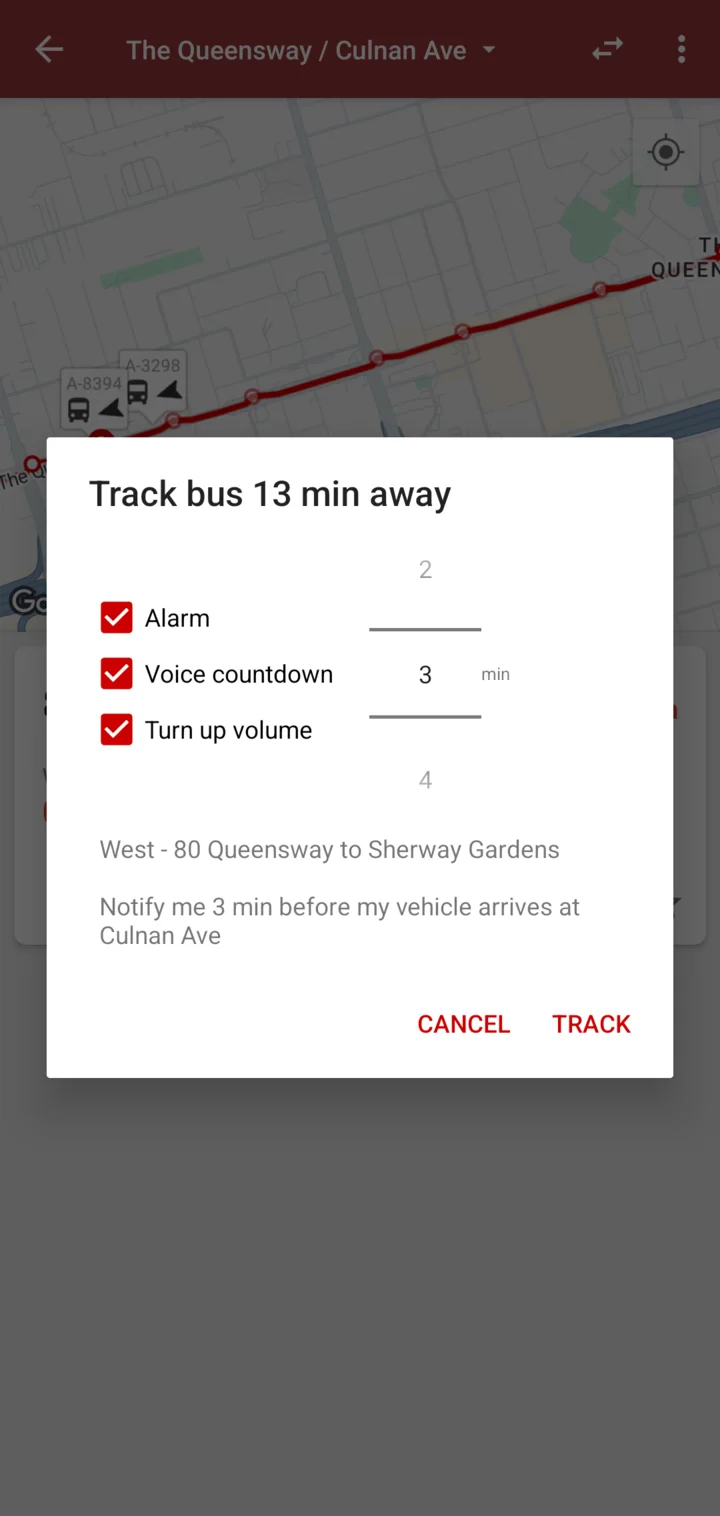
On Android, open a stop and tap the timer icon on your route to track it. Three boxes are already ticked: Alarm, Voice countdown and Turn up volume. Pick how many minutes of warning you want, then tap Track again.
On iPhone, tap the speaker on a route. Choose your bus, how many minutes of warning you want, and whether to speak the countdown out loud. Then tap Start voice countdown.
Loud when it talks, and only then
A voice countdown is no good if you can't hear it over traffic. But nobody wants their phone blasting at full volume all day.
So on Android, Turn up volume raises the volume only while each announcement is playing. As soon as it's done, your volume goes back to where you had it.
If you're wearing headphones or hearing aids, or you're plugged into a car stereo, Transit Now leaves your volume alone. The voice plays at the level you set, through whatever you're listening with. And if music is playing, the music dips while the voice talks, then comes back.
On iPhone, the countdown still plays when your phone is on silent, as long as the app is open. If silent mode would stop you hearing it later, the app tells you before you start. It warns you if your volume is very low, too.
Alarms you can feel
Sometimes you can't hear anything at all: a streetcar going by, a noisy platform, a crowded bus. So the alarm on Android is something you can feel too.
- When it's time, the screen lights up and the phone buzzes three times, one second each.
- While you wait, there's a short buzz each time the minute changes. You can count them in your pocket.
The notification says it plainly: “Your ride is arriving!”
Knowing when to get off
Getting on is only half the trip. If you can't read the street signs going past, it's easy to miss your stop.
So you can tell Transit Now where you're getting off. On iPhone, tap the flag on a stop and answer three questions: Where are you getting off? Which vehicle? And how much warning you want. First you'll get “get off soon”, then “Get off at” and the name of your stop. If you like, it can announce each minute out loud until then.
On Android, tap the destination button on a route, pick your stop, then tell it where you are: still at the stop, or already on board. It lets you know a few minutes before you get there.
Easier to see, too
For when you do look at the screen:
- Big numbers. The countdown is big and bold. Under three minutes, the iPhone app shows minutes and seconds, like 2:45, with the minutes large and the seconds smaller.
- Colour, plus the number. Red means it's right there, green means you've got time. The colours are a bonus. The number is always there too, so you never have to tell red from green.
- Your text size. Both apps follow your phone's text size setting. On iPhone, when the text gets really big, long stop names shorten to just the cross street so they still fit.
- Dark and high contrast. iPhone has a dark mode. Android has night mode, an automatic sunset theme, and a High contrast, darker theme for night mode.
Tell me what's hard
Voice countdown has been part of Transit Now for more than ten years. It started as a convenience. For some riders, it's the whole app.
If something is hard to see or hear, or you use TalkBack or VoiceOver and a button doesn't say what it does, please tell me which one: support@transitnowapp.com.
And if someone you know has trouble reading the arrival board, set up the voice countdown for them. Listen for the ding-dong.