Your bus, on your wrist: Transit Now for Wear OS
Nearby stops, a countdown on your watch face, and arrivals that stay on screen. Rebuilt for today's watches.
It's January. You're at the stop with a coffee in one hand and a bag in the other. You'd like to know when the streetcar's coming. Getting your phone out means putting something down in the slush.
That's the moment Transit Now for Wear OS is for. A quick look at your wrist, and you know.
I made the first Transit Now watch app back in 2015, for what was then called Android Wear. This summer I rebuilt it from scratch for today's Wear OS watches.
Your stops, one swipe apart
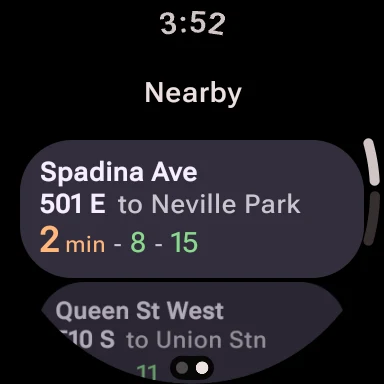
Open the app and you get two pages: Favourites and Nearby. Swipe between them. The app remembers which one you used last, and if you haven't saved any favourites yet, it goes straight to Nearby.
Each stop is one card: the street, the route, which way it's going, and the next few arrivals. The times use the same colours as the phone. Red or orange means it's close. Green means you've got time.
Nearby uses your watch's own location, so it follows you as you walk. If your watch doesn't have GPS, it uses your phone's.
Tap a stop for the whole picture
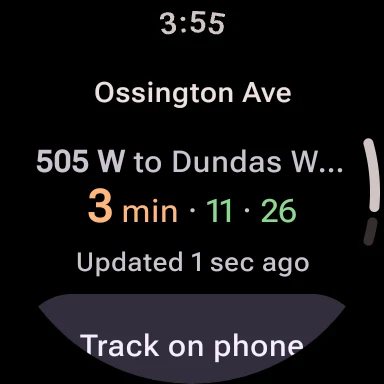
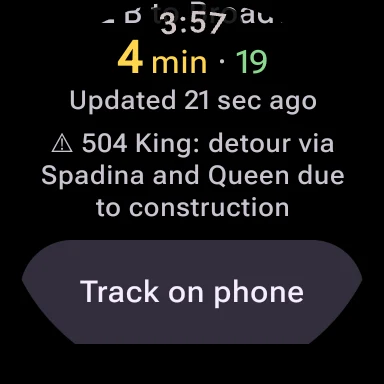
Tap a stop to see every direction and the next arrivals for each. It also shows how busy the bus is when that's known, and any service alert for the route, like a detour.
The times refresh on their own every 30 seconds while you're looking. Under them, a small line says how fresh they are: “Updated 1 sec ago.” If the watch can't reach your phone, it tells you, and shows the last times it had instead of guessing.
A countdown on your watch face
When you open a stop, a live countdown appears on your watch face, something like 504A 3:12. You can go back to the time, the weather, whatever you had there, and the bus keeps counting down in the corner. Tap it to jump back into the stop.
It clears itself after 45 minutes, so it won't hang around after you're on board.
Stays on, even when the screen dims
Drop your wrist and most apps disappear. With a stop open, Transit Now stays on the always-on screen instead, in dimmed black and grey: the time, the arrivals, and how long ago they were updated. Glance down, and it's still there.
Track it from your wrist
At the bottom of every stop there's a Track on phone button. Tap it and your phone starts tracking that bus, with the alarm and voice countdown you already know from the phone app. The tracking notification shows up on your watch too, with a Refresh button right there.
So the phone stays in your pocket. The watch taps your wrist when it's time to go.
What you need
- An Android phone with Transit Now from Google Play. The watch gets everything through your phone.
- A watch running Wear OS 3 or newer. That's most Wear OS watches from the last few years, including Pixel Watch and Galaxy Watch.
Install Transit Now on your phone, then find it in the Play Store on your watch. The watch app has no ads.
If you use an Apple Watch, sorry. There isn't a version for it.
Eleven years on the wrist
The first watch app only showed your favourites. This one does a lot more, and it was built to fit the round screen properly.
If you try it, I'd love to hear how it works on your watch: support@transitnowapp.com.